Agentic Coding
Introduction to Agentic Coding
MLS · Machine Learning Systems · Workshop
From vibe coding to engineering with AI agents
🤖 Agent Loop · 🔌 MCP · 🔧 Tools · 🧠 Memory · 📐 Skills
The Road to Agentic Coding
| When | What | Note |
|---|---|---|
| 2023 | “The hottest new programming language is English.” | — Karpathy |
| Feb 2025 | “Vibe coding” coined | “Forget the code exists.” Collins Word of the Year. |
| Late 2025 | The hangover | Security flaws. Unmaintainable code. |
| Feb 2026 | “Agentic engineering” | Orchestrate agents with oversight. Human as reviewer. |
Key shift: From “accept all, don’t read diffs” → “define goals, review results, verify performance.”
The 8 Stages of Dev Evolution to AI
- Zero/near-zero AI. Maybe code completions, sometimes ask Chat.
- Coding agent in IDE, permissions on. Sidebar asks to run tools.
- Agent in IDE, YOLO mode. Trust goes up, permissions off.
- Wide agent fills the screen. Code is just for reviewing diffs.
- CLI, single agent, YOLO. Diffs scroll by. May or may not read.
- CLI, multi-agent, YOLO. 3–5 parallel instances. Very fast.
- 10+ agents, hand-managed. Pushing limits of orchestration.
- Building your own orchestrator. Automating the workflow itself.
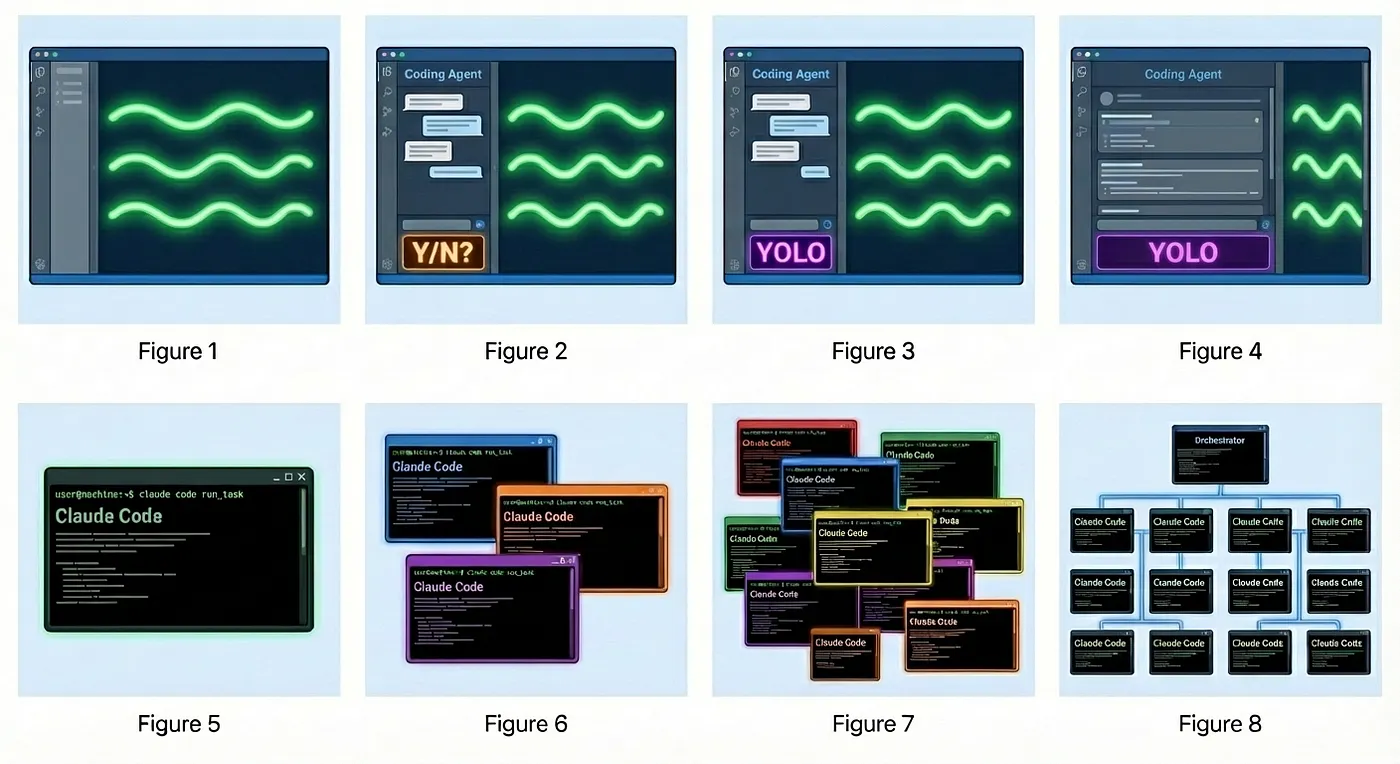
Ref: Steve Yegge — “Welcome to Gas Town” (2025)
What Changed: Capability Leap
Early 2025 — Autocomplete
1 | |
Human does all the work.
2026 — Autonomous Agent
1 | |
Agent loops until pass; human reviews.
Model Timeline
| Date | Model | Highlights |
|---|---|---|
| Sep 2025 | Sonnet 4.5 | SWE-bench 77.2%, 30+ hour tasks |
| Nov 2025 | Opus 4.5 | Flagship reasoning, major coding gains |
| Feb 2026 | Opus 4.6 + Sonnet 4.6 | Agent Teams, 1M context, SWE-bench 79.6% |
Key insight: Models went from “fancy autocomplete” to autonomous multi-step execution. That’s the difference between Copilot 2024 and Claude Code 2026.
The Agent Loop: Reason → Act → Observe
1 | |
- Reason — Plan approach
- Act — Write code, run commands
- Observe — Read test output
- Human Review — Approve & ship
Human role: Define goals, review results, understand the hardware. The agent writes code; you verify it’s correct and efficient.
Don’t just ask “do everything” — there’s a smarter way
Let’s learn how to break tasks into agentic skills.
From Agents to Skills: The Evolution
- 2024–25 — Simple Prompt Agents — save users time, reduce repetitive context input. Each conversation starts from scratch.
- 2025 — MCP (Model Context Protocol) — replaces ad-hoc API integrations. Gives AI structured documentation about tools + JSON-formatted output for precise tool calls.
- 2025–26 — Skills + CLAUDE.md — persistent project rules, coding patterns, test workflows. Context survives across sessions. Agentic programming can finally manage context at scale.
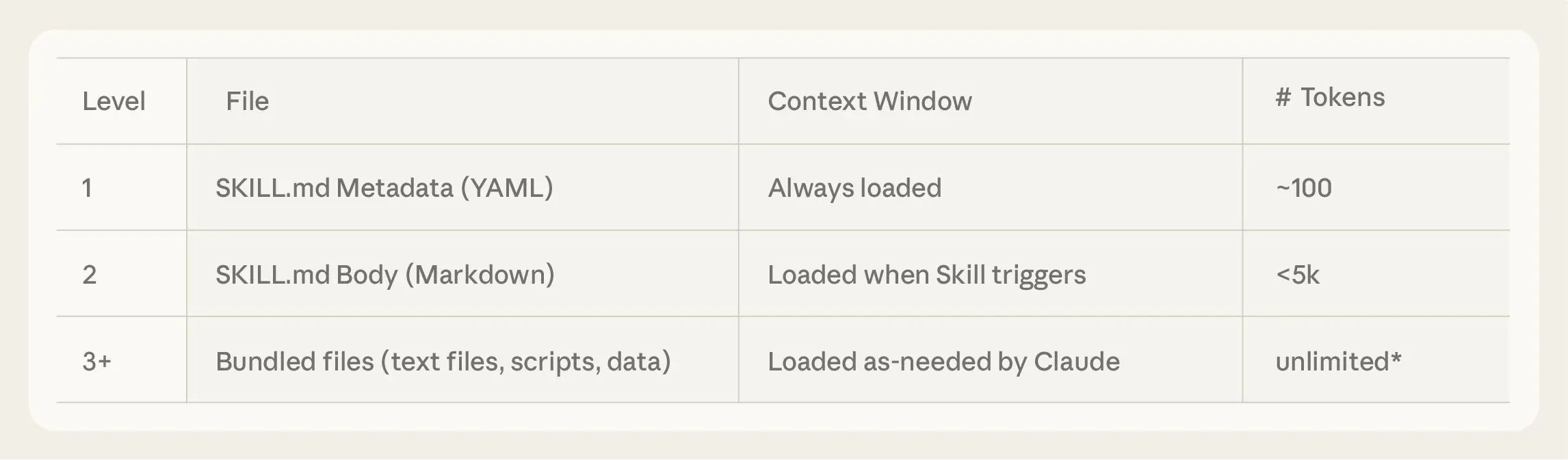
Result: Agent + Skills + Agent VM = an autonomous coding partner, not just a chatbot.
The Stack: Agent + MCP + Skills
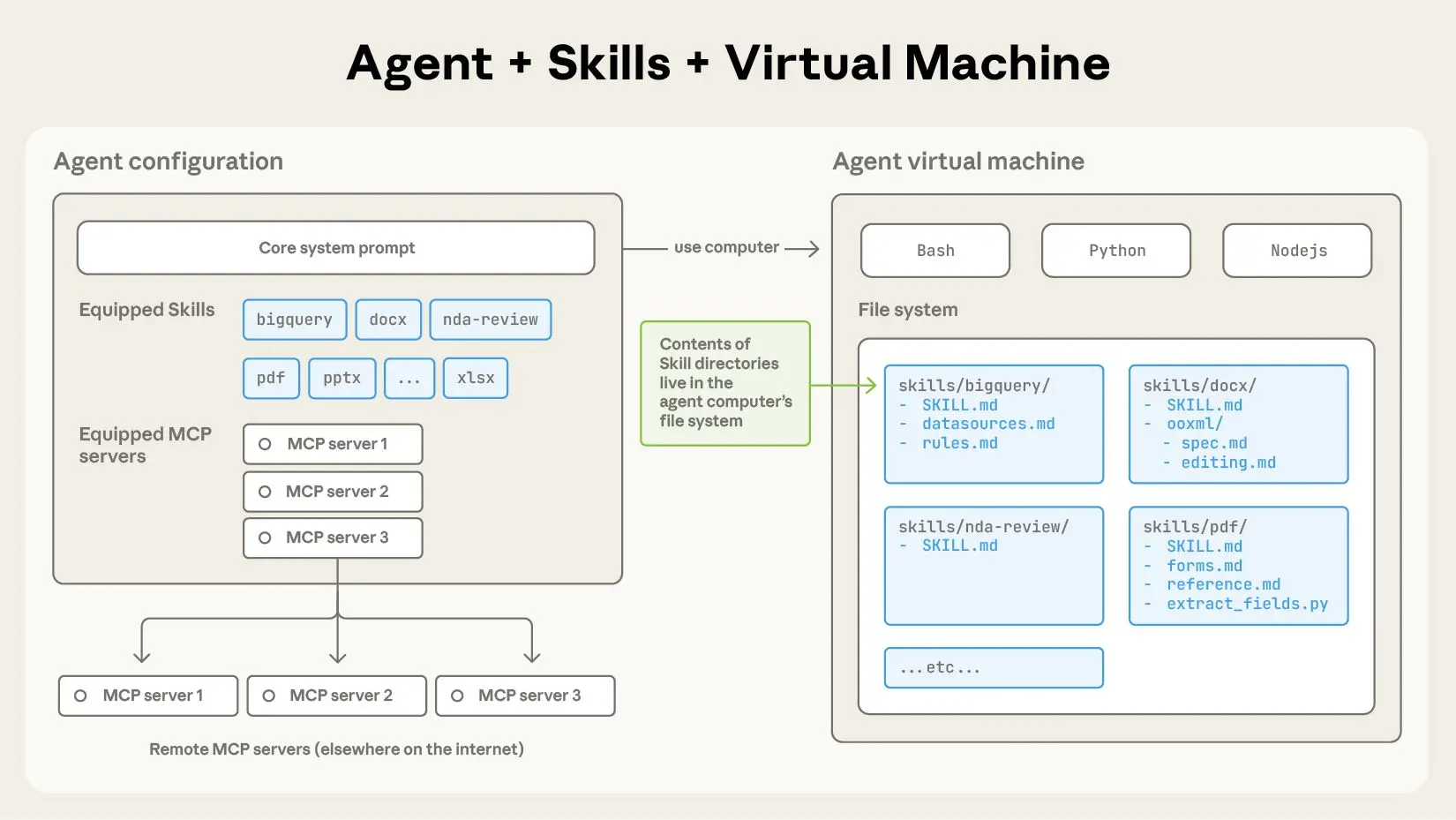
🤖 Agent — the reasoning engine
Reason → Act → Observe → Loop. Drives the autonomous cycle.
🔌 MCP — connect external tools
Gives AI structured docs about external tools + JSON output for precise API calls.
📐 Skills — what to do & how
Folders of instructions (SKILL.md) + scripts + reference files. Agent discovers & loads them on demand.
Most skills execute locally but in separate virtual environments (e.g. Python venv, Node env) to isolate dependencies and side effects.
Skills encode workflows; MCP connects tools; the Agent reasons over both. Together they turn a chatbot into an autonomous coding partner.
Ref: Equipping agents for the real world with agent skills
Skill Example: Simple Skill
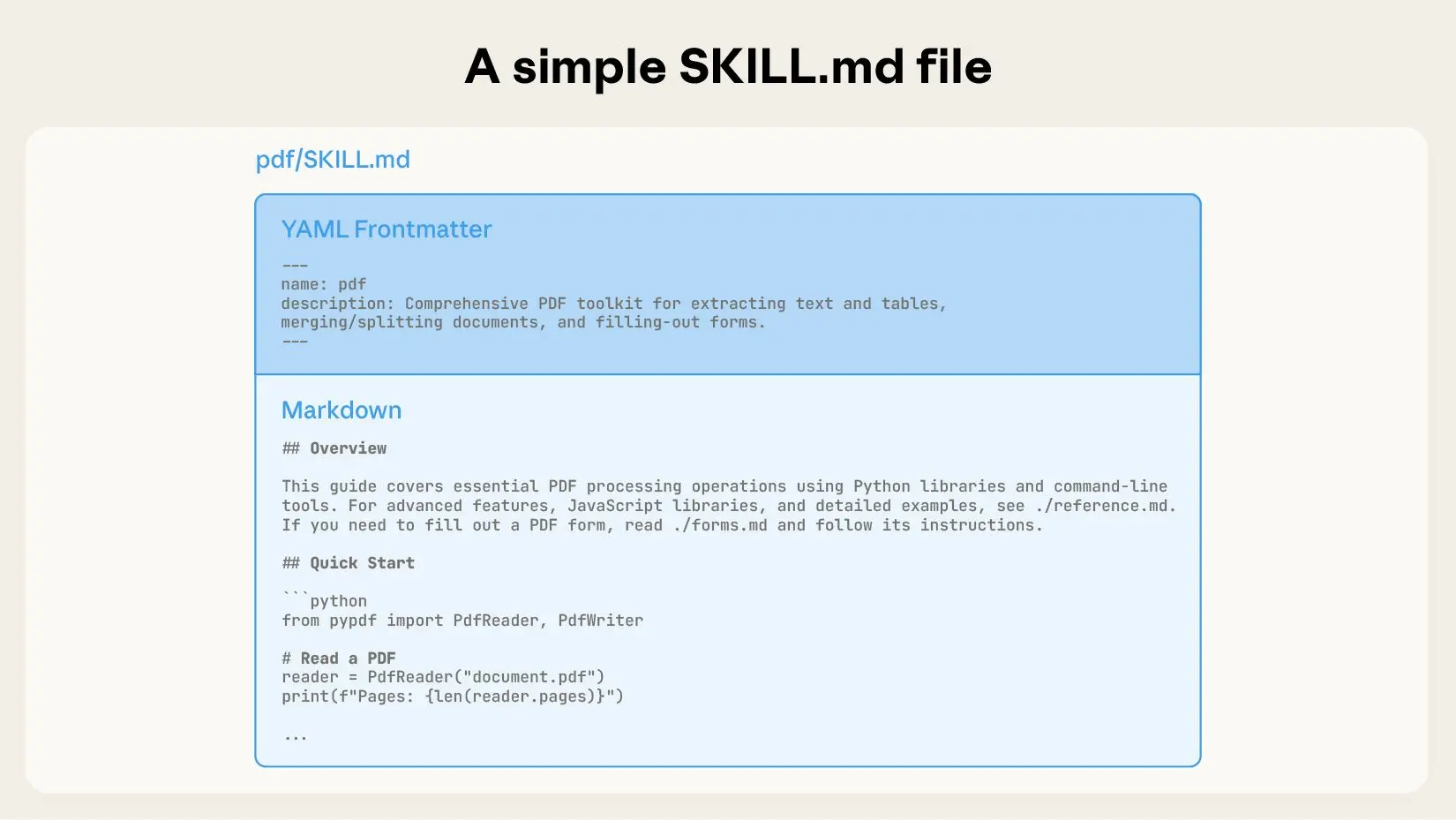
A single SKILL.md file with all instructions.
- Name + description — agent decides when to load
- Instructions — step-by-step workflow
- No extra files — everything fits in one document
Good for: commit conventions, code review checklists, deploy scripts.
Ref: Equipping agents for the real world with agent skills
Skill Example: Complex Skill
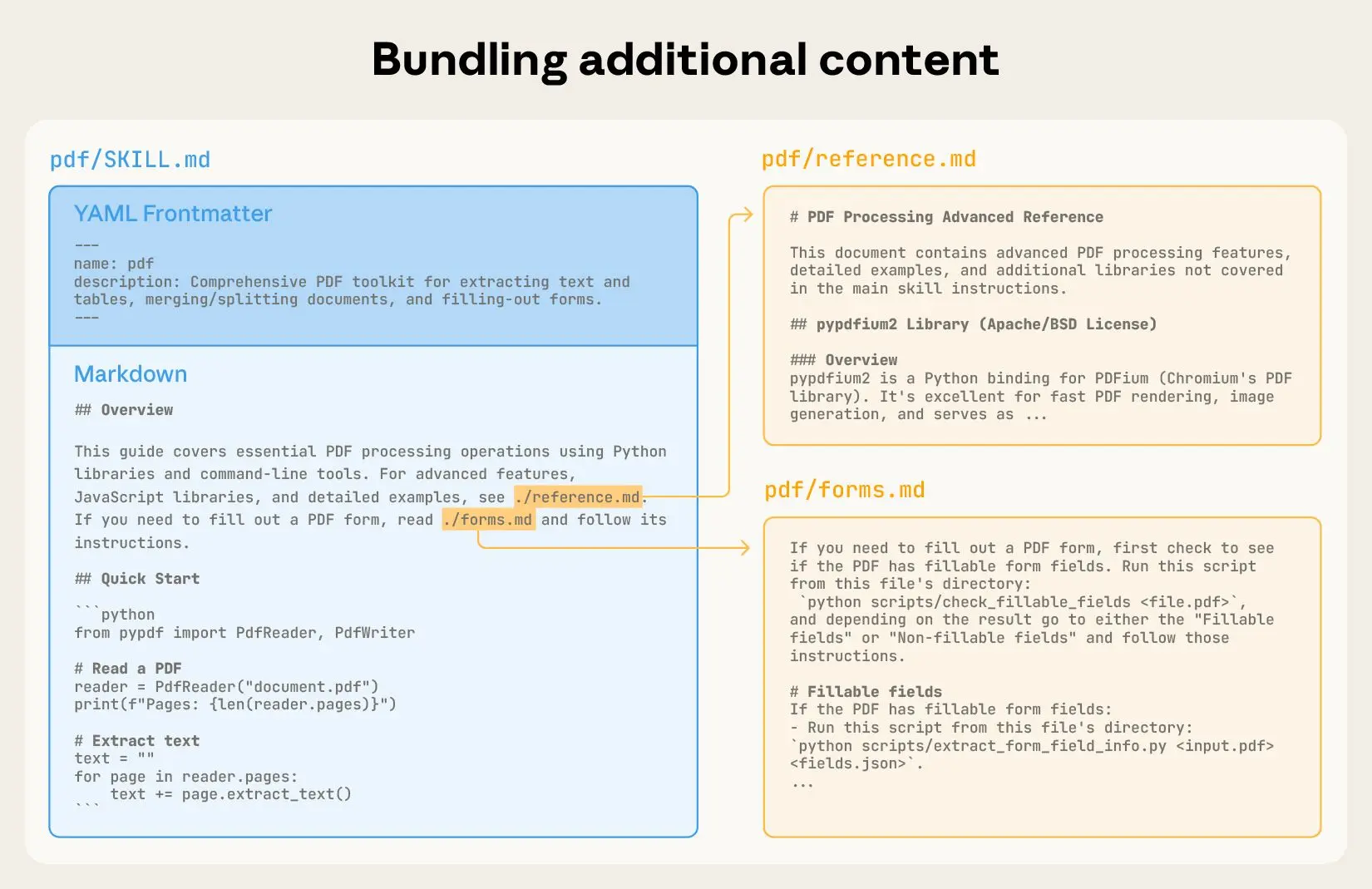
SKILL.md + optional bundled components, loaded on demand.
SKILL.md— core instructions (always the entry point)
Common optional extensions:
code/— executable scripts, helperstemplates/— boilerplate, scaffoldingforms/— structured input schemasreference/— docs, examples, specs
Agent only pulls each component when the task actually needs it — keeps the context window lean.
Ref: Equipping agents for the real world with agent skills
Comparing Agentic Tools
| Claude Code / Cursor | Copilot (Plugin) | |
|---|---|---|
| Form factor | Terminal / Full IDE | VS Code extension |
| Context | @ to add files & folders |
@ to add files |
| Commands | / to invoke tools & skills |
/ to load saved prompts |
| Agent loop | YOLO mode, git worktree for parallel agents | Chat + inline |
- Claude Code / Codex — best-in-class context management. Auto-compresses long conversations. Built-in Plan Mode for orchestration.
- Other CLIs (Aider, OpenCode, etc.) — similar results with plugins like Taskmaster, but require manual config.
- IDE Plugins (Copilot, etc.) — IDE-scoped context makes it harder to scale to multi-agent. Cursor’s full-screen agent is a step in this direction.
Note: boundaries aren’t absolute — Cursor has its own agent mode, and Cline as a plugin also supports full agent workflows. What matters is learning to use agent skills effectively.
Tests = Agent’s Feedback Signal
1 | |
Without clear pass/fail, the agent can’t self-correct.
Best Practices & Pitfalls
✅ DO
- One task at a time → test → next
- Feed errors + reference code to agent
- Ask agent to explain its reasoning and key decisions
- Profile and benchmark to verify performance
- Use profiling tools to locate bottlenecks
- Use
CLAUDE.mdfor project rules
❌ DON’T
- Generate entire project at once
- Ship code you haven’t read
- Ignore shape mismatches or type errors
- Ask “why broken?” without the error message
- Accept “optimal” without checking actual performance
- Let the agent modify core infrastructure files without review
Quick Start: Get Going Today
npm install -g @anthropic-ai/claude-code— Install (Node.js 18+)cd your-project && claude— Launch in your project directory"Read the README and explain the project structure"— Agent analyzes"Implement feature X following the existing patterns. Run the tests."— Start small"Fix any failing tests and explain what went wrong"— Let the agent loop
Alternatives: Cursor · GitHub Copilot (free for students) · Antigravity
Summary
Agentic coding is not about replacing you
- 🔄 Agent loop: Reason → Act → Observe → Loop
- 🔧 Tools + Memory + Skills = capable agent
- 🔌 MCP standardizes agent ↔ tool connections
- ✅ Tests enable the autonomous feedback loop
- 📊 Profiling — locate bottlenecks, don’t guess
- 🧠 Understanding the code is still your job
Questions? 🚀